
Query
The Portfolio Query API allows you to make dynamic portfolio query requests without referencing an Addepar view ID. The interface is useful for portfolio integrations that allow end-users to adjust Addepar attributes such as Time Weighted Return.
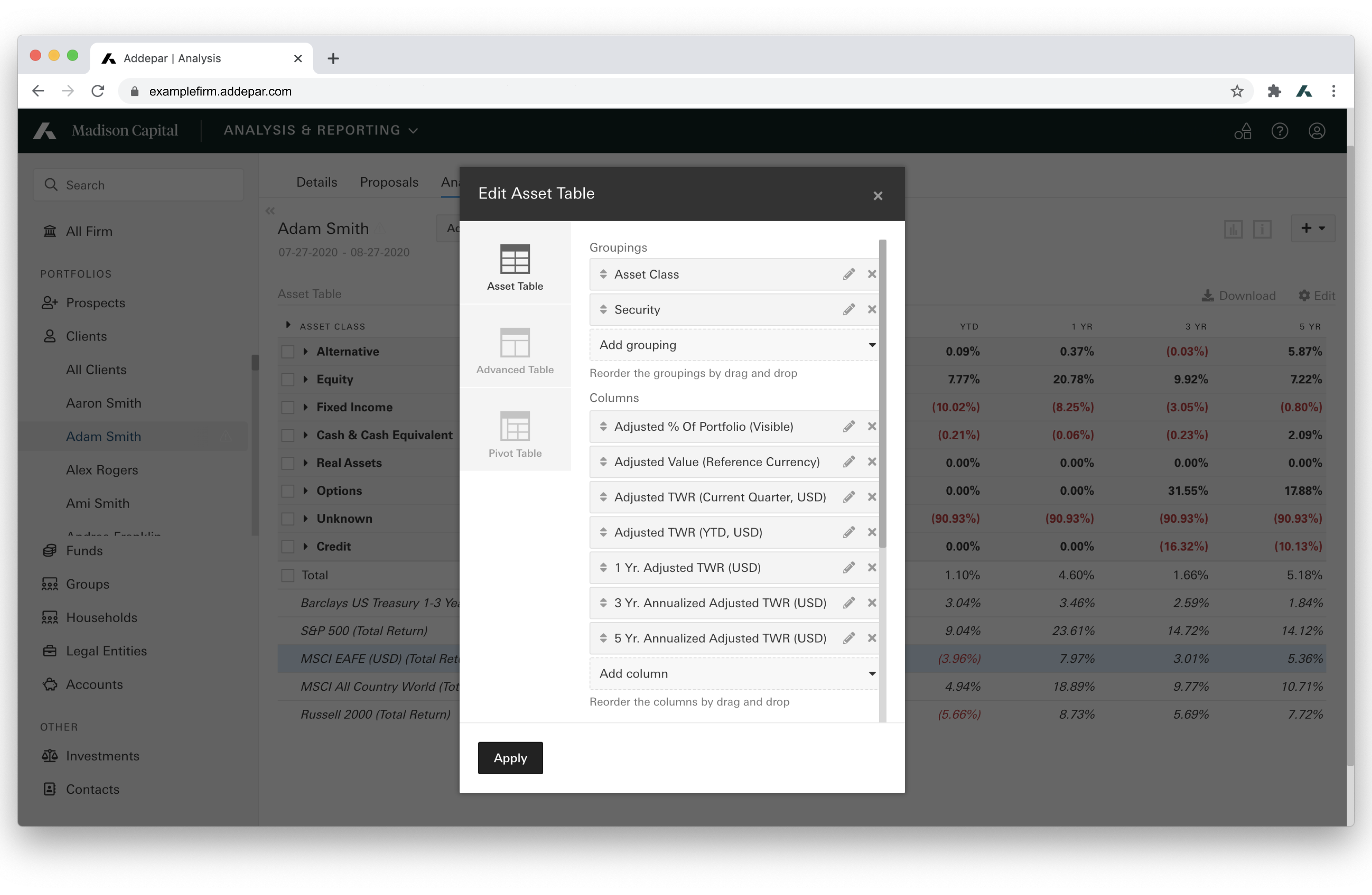
Analysis View Configuration (In-App)
Resource Overview
The Portfolio Query API returns a resource object described by the below attributes and will appear in successful POST responses. A meta-object will also be returned in the response detailing the columns and groupings used in the query.
| Attribute | Description | Example |
|---|---|---|
total | The total portfolio value for each column attribute. Object.
| { "name": "Total", "columns": { "time_weighted_return": 0.014858065416061494, "value": 4.394550141172772E8} |
children | The grouping level values of the query. Includes a value for each column and grouping attribute. Array of Objects. | { "name": "Cash & Cash Equivalent", "grouping": "asset_class", "columns": { "time_weighted_return": -0.059294573135900364, "value": 1.1442715559999999E7} |
Parameters
Required Parameters:
| Parameter | Description | Example |
|---|---|---|
columns | List of column attribute keys with optional arguments. Array of Objects. Omitted arguments will use default values. See Attributes to discover supported attributes. See Arguments to discover supported attribute arguments. | [{"key": "time_weighted_return"}] |
groupings | List of grouping attribute keys with optional arguments. Array of Objects. Omitted arguments will use default values. See Attributes to discover supported attributes. See Arguments to discover supported attribute arguments. | [{"key": "asset_class"}] |
start_date | The start date of the time period of portfolio data. String. "YYYY-MM-DD" | "2011-12-31" |
end_date | The end date of the time period of portfolio data. String. “YYYY-MM-DD” | "2013-01-15" |
portfolio_type | The type of portfolio. String. Supported values: - | "ENTITY" |
portfolio_id or external_ids See below. | The ID of a portfolio configured in Addepar. Number or [Number]. A portfolio can be either an entity (i.e. a client, account, legal entity etc.) or a group of entities. If the |
|
external_ids | The external ID of a portfolio configured in Addepar. [String]. See External IDs (Beta) to learn more about External IDs. | [{ "external_type_key": "salesforce", "external_id": "example_salesforce_id" }] |
Query Portfolio Data
The Portfolio Query Builder can be used to convert an analysis view table into a Portfolio Query API request body.
Returns portfolio data based on the given query parameters.
POST /v1/portfolio/query
Example:
POST https://examplefirm.addepar.com/api/v1/portfolio/query

{
  "data": {
    "type": "portfolio_query",
    "attributes": {
      "columns": [
        {"key": "time_weighted_return"}
      ],
      "groupings": [
        {"key": "asset_class"}
      ],
      "portfolio_type": "ENTITY",
      "portfolio_id": [329263, 259910],
      "start_date": "2018-06-30",
      "end_date": "2018-09-30"
    }
  }
}
HTTP/1.1 200
{
"meta":{
"columns":[
{
"key":"time_weighted_return",
"display_name":"TWR (USD)",
"output_type":"Percent",
"currency":"USD"
}
],
"groupings":[
{
"key":"asset_class",
"display_name":"Asset Class"
}
]
},
"data":{
"type":"portfolio_views",
"attributes":{
"total":{
"name":"Total",
"columns":{
"time_weighted_return":0.023992155163590434
},
"children":[
{
"name":"Cash & Cash Equivalent",
"grouping":"asset_class",
"columns":{
"time_weighted_return":-0.002332896014161534
},
"children":[
]
},
{
"name":"Equity",
"grouping":"asset_class",
"columns":{
"time_weighted_return":0.09047133778274707
},
"children":[
]
},
{
"name":"Fixed Income",
"grouping":"asset_class",
"columns":{
"time_weighted_return":5.433985661802421E-4
},
"children":[
]
},
{
"name":"Hedge Fund",
"grouping":"asset_class",
"columns":{
"time_weighted_return":0.0
},
"children":[
]
},
{
"name":"Private Equity",
"grouping":"asset_class",
"columns":{
"time_weighted_return":-9.164759058766236E-5
},
"children":[
]
},
{
"name":"Alternative",
"grouping":"asset_class",
"columns":{
"time_weighted_return":null
},
"children":[
]
},
{
"name":"Real Assets",
"grouping":"asset_class",
"columns":{
"time_weighted_return":0.0
},
"children":[
]
},
{
"name":"Unknown",
"grouping":"asset_class",
"columns":{
"time_weighted_return":null
},
"children":[
]
}
]
}
}
},
"included":[
]
}Response Codes:
200 OK: Success400 Bad Request: Improperly formatted query or lacking necessary data permissions- Certain market data attributes may not be used in developer APIs without additional licenses. If encountered, reach out to Addepar Support for additional information.
403 Forbidden: User lacks API permission or has not granted the appropriate scope
Optional Parameters:
| Parameter | Description | Example |
|---|---|---|
filters | A portfolio query filter may be attached to a portfolio query to filter rows from the result. Array of Objects. To learn more, reference the Filter Object section below. | [{"attribute": "asset_class", "type": "discrete", "operator": "include", "values": ["Equity", "Fixed Income"]} |
hide_previous_holdings | Set to true to exclude holdings not held at end of current period. Boolean. (default: false) | false |
group_by_historical_values | Set to true to include previous values when grouping on a time varying attribute. Boolean. (default: false) | true |
group_by_multiple_attribute_values | Set to true to breakout groupings by each value in an attribute with multiple values. Boolean. (default: false) | false |
look_through_composite_securities | Set to true to look through components of composite securities (eg. funds). Boolean. (default: false) | false |
look_through_constituent_holdings | Set how many constituents are returned in the response by lookthrough type and threshold. Threshold is a number or can be null. Supported type values: - | "look_through_constituent_holdings": { "type": "top", "threshold": 10 }, |
display_account_fees | Set to true to show account fees. Boolean. (default: false) | false |
Example:
POST https://examplefirm.addepar.com/api/v1/portfolio/query

{
  "data":{
    "type":"portfolio_query",
    "attributes":{
      "columns":[
        {
          "key":"value"
        }
      ],
      "groupings":[
        "asset_class"
      ],
      "portfolio_type":"FIRM",
      "portfolio_id":1,
      "start_date":"2020-02-01",
      "end_date":"2020-06-01",
      "hide_previous_holdings":true,
      "group_by_multiple_attribute_values":true
    }
  }
}
HTTP/1.1 200
{
"meta":{
"columns":[
{
"key":"value",
"display_name":"Value (USD)",
"output_type":"Number",
"currency":"USD"
}
],
"groupings":[
{
"key":"asset_class",
"display_name":"Asset Class"
}
]
},
"data":{
"type":"portfolio_views",
"attributes":{
"total":{
"name":"Total",
"columns":{
"value":4.371024413999725E8
},
"children":[
{
"name":"Cash & Cash Equivalent",
"grouping":"asset_class",
"columns":{
"value":1.1442713893333333E7
},
"children":[
]
},
{
"name":"Equity",
"grouping":"asset_class",
"columns":{
"value":2.5993525600627503E8
},
"children":[
]
},
{
"name":"Fixed Income",
"grouping":"asset_class",
"columns":{
"value":4.555629874790781E7
},
"children":[
]
},
{
"name":"Derivative",
"grouping":"asset_class",
"columns":{
"value":9548725.0
},
"children":[
]
},
{
"name":"Hedge Fund",
"grouping":"asset_class",
"columns":{
"value":4.175902058892848E7
},
"children":[
]
},
{
"name":"Private Equity",
"grouping":"asset_class",
"columns":{
"value":6411993.603527796
},
"children":[
]
},
{
"name":"Alternative",
"grouping":"asset_class",
"columns":{
"value":1.0651418879999999E7
},
"children":[
]
},
{
"name":"Real Assets",
"grouping":"asset_class",
"columns":{
"value":219414.12
},
"children":[
]
},
{
"name":"Unknown",
"grouping":"asset_class",
"columns":{
"value":5.157760056E7
},
"children":[
]
}
]
}
}
},
"included":[
]
}
NoteThe below attributes are currently unsupported:
- Allocation Deviation
- Allocation Deviation (%)
- Benchmark
- Benchmark (Rollup)
- Target Allocation
- Benchmark (Rollup)
- Target Allocation Range
Filter Object
Filters are used in Analysis Views to filter data. For example, to see only equities, you can filter by asset class.
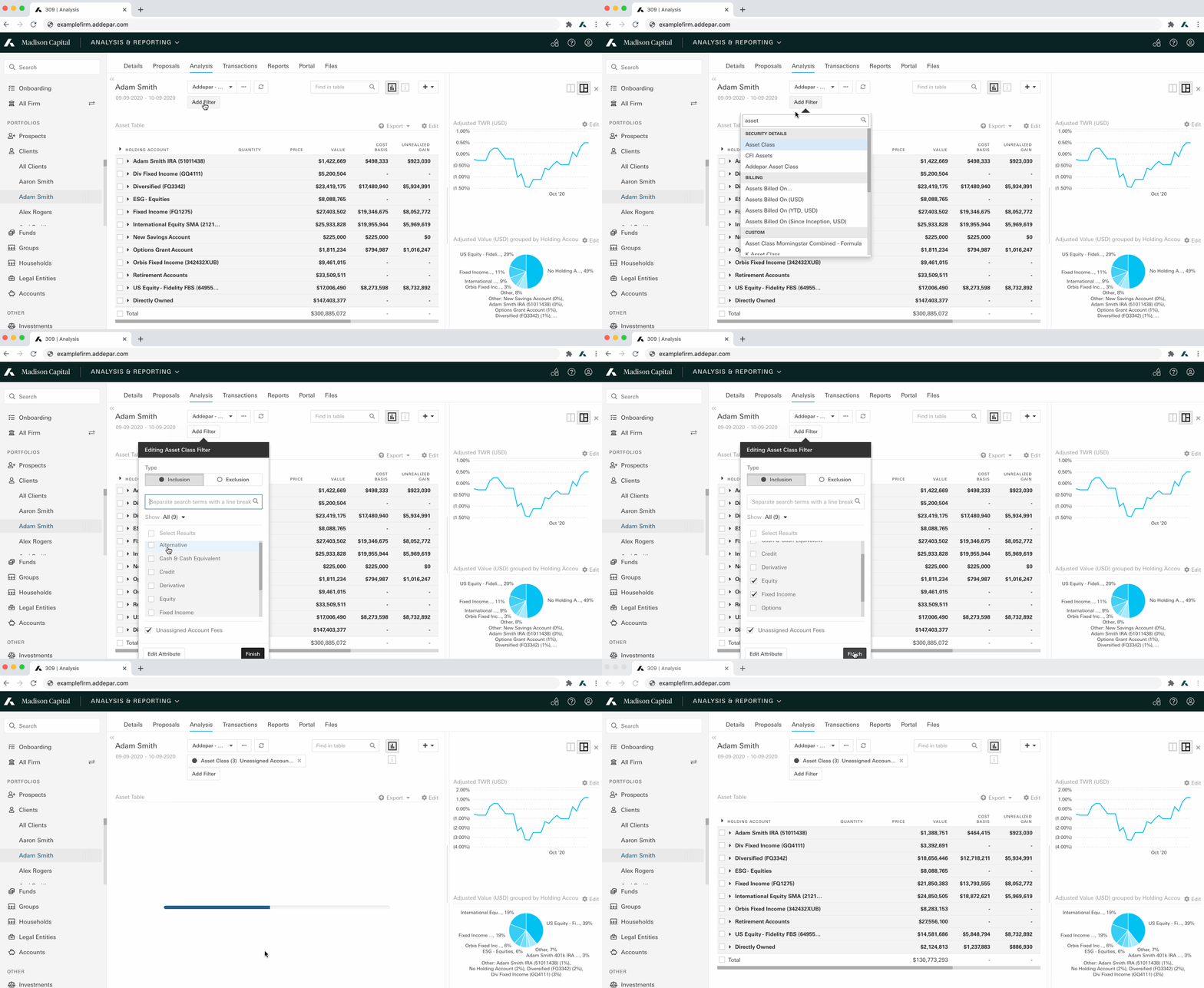
Analysis View Filters (In-App)
NoteDate Filters are not currently supported.
Filter Parameters
| Parameter | Description | Example |
|---|---|---|
attribute | The instance of the portfolio query attribute to be filtered on. String. | "asset_class" |
type | Specifies the type of filter to be applied, which is based on the output type of the attribute. String. Supported Values: - | "discrete" |
operator | Specifies the operation of the filter. String. Supported Values ( - - - - | "include" |
values | List of String values to include or exclude. [String] | ["Equity", "Fixed Income"] |
ranges | List of to / from pairs. Required for | [{"from": 0.01, "to": 10000}, {"from": -10000, "to": -0.01}] |
rank_order | Returns either the top or bottom results of the rank filter operation. String. Required for Supported Values: - | "top" |
rank_value | The # of values to return in the rank filter operation. Number. Required for | 10 |
grouping_attribute | Narrow the data according to the values of aggregated positions. String. Optional for number. | "asset_class" |
unassigned_account_fees | Set to include or exclude unassigned account fees. Boolean. Fees are “unassigned” when the results do not include the asset they’re associated with. Optional for discrete. Default is | true |
Example:
POST https://examplefirm.addepar.com/api/v1/portfolio/query

{
  "data":{
    "type":"portfolio_query",
    "attributes":{
      "columns":[
        {
          "key":"cost_basis"
        }
      ],
      "groupings":[
        {
          "key":"holding_account"
        }
      ],
      "filters":[
        {
          "attribute":"asset_class",
          "type":"discrete",
          "operator":"include",
          "values":[
            "Equity",
            "Fixed Income"
          ]
        },
        {
          "attribute":{
            "key":"investment_type"
          },
          "type":"discrete",
          "operator":"exclude",
          "values":[
            "Hedge Fund"
          ]
        }
      ],
      "portfolio_type":"GROUP",
      "portfolio_id":9559,
      "start_date":"2018-06-30",
      "end_date":"2018-09-30"
    }
  }
}
HTTP/1.1 200
{
"meta": {
"columns": [
{
"key": "cost_basis",
"display_name": "Original Cost Basis (USD)",
"output_type": "Number",
"currency": "USD"
}
],
"groupings": [
{
"key": "holding_account",
"display_name": "Holding Account"
}
]
},
"data": {
"type": "portfolio_views",
"attributes": {
"total": {
"name": "Total",
"columns": {
"cost_basis": 2.1105883993468016E7
},
"children": [
{
"entity_id": 2260636,
"name": "Adam Smith IRA (786581)",
"grouping": "holding_account",
"columns": {
"cost_basis": 1255000.0
},
"children": [
{
"entity_id": 2260640,
"name": "Pershing (DMA 859658)",
"grouping": "holding_account",
"columns": {
"cost_basis": 690000.0
},
"children": []
},
{
"name": "Directly Owned",
"grouping": "holding_account",
"columns": {
"cost_basis": 565000.0
},
"children": []
}
]
},
{
"entity_id": 259885,
"name": "Manager A",
"grouping": "holding_account",
"columns": {
"cost_basis": 4516070.2846626425
},
"children": [
{
"entity_id": 259825,
"name": "DJIA ETF 90",
"grouping": "holding_account",
"columns": {
"cost_basis": 367853.25000000006
},
"children": []
},
{
"name": "Directly Owned",
"grouping": "holding_account",
"columns": {
"cost_basis": 4148217.034662644
},
"children": []
}
]
},
{
"entity_id": 260654,
"name": "Manager C",
"grouping": "holding_account",
"columns": {
"cost_basis": 3021140.808805371
},
"children": []
},
{
"entity_id": 259875,
"name": "Manager I",
"grouping": "holding_account",
"columns": {
"cost_basis": 679996.67
},
"children": []
},
{
"entity_id": 260737,
"name": "Manager K",
"grouping": "holding_account",
"columns": {
"cost_basis": 1283492.04
},
"children": []
},
{
"entity_id": 260740,
"name": "Manager M",
"grouping": "holding_account",
"columns": {
"cost_basis": 2379993.2
},
"children": []
},
{
"entity_id": 2260638,
"name": "Southern Trust Fixed Income SMA (600551984)",
"grouping": "holding_account",
"columns": {
"cost_basis": 7970190.99
},
"children": []
}
]
}
}
},
"included": []
}Arguments
Addepar uses arguments or parameters to modify the settings of a calculation. Some examples are Currency and Adjusted Value for the Value attribute.
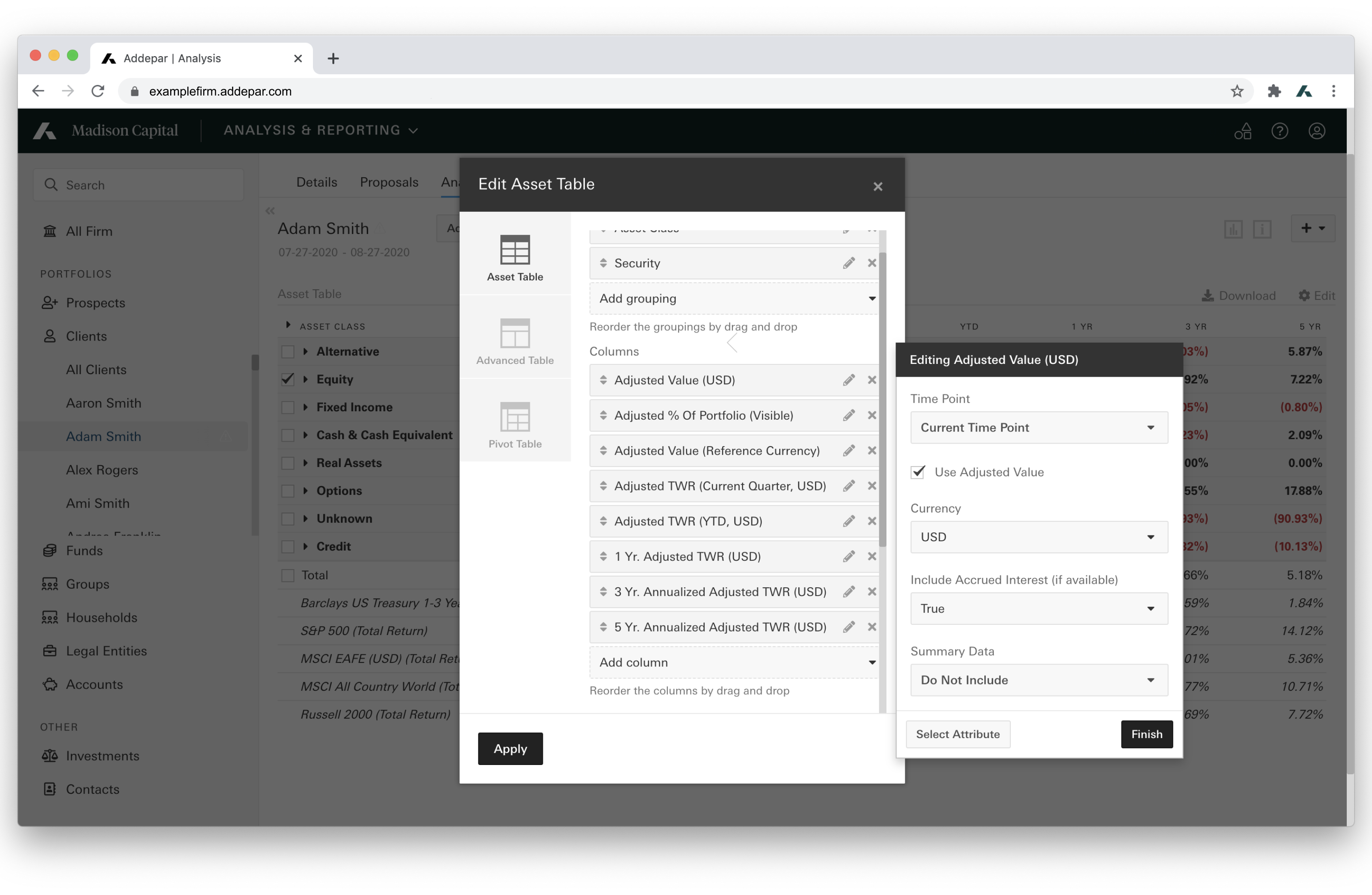
Adjusted Value (In-App)
Example:
POST https://examplefirm.addepar.com/api/v1/portfolio/query

{
  "data":{
    "type":"portfolio_query",
    "attributes":{
      "columns":[
        {
          "key":"value",
          "arguments":{
            "adjusted":true
          }
        }
      ],
      "groupings":[
        "asset_class"
      ],
      "portfolio_type":"FIRM",
      "portfolio_id":1,
      "start_date":"2020-02-01",
      "end_date":"2020-06-01"
    }
  }
}
HTTP/1.1 200
{
"meta":{
"columns":[
{
"key":"value",
"display_name":"Adjusted Value (USD)",
"output_type":"Number",
"currency":"USD"
}
],
"groupings":[
{
"key":"asset_class",
"display_name":"Asset Class"
}
]
},
"data":{
"type":"portfolio_views",
"attributes":{
"total":{
"name":"Total",
"columns":{
"value":4.5070496789997244E8
},
"children":[
{
"name":"Cash & Cash Equivalent",
"grouping":"asset_class",
"columns":{
"value":1.1442713893333333E7
},
"children":[
]
},
{
"name":"Equity",
"grouping":"asset_class",
"columns":{
"value":2.63985255006275E8
},
"children":[
]
},
{
"name":"U.S. Equity",
"grouping":"asset_class",
"columns":{
"value":0.0
},
"children":[
]
},
{
"name":"Fixed Income",
"grouping":"asset_class",
"columns":{
"value":4.555629874790781E7
},
"children":[
]
},
{
"name":"Derivative",
"grouping":"asset_class",
"columns":{
"value":9548725.0
},
"children":[
]
},
{
"name":"Hedge Fund",
"grouping":"asset_class",
"columns":{
"value":4.114859252892848E7
},
"children":[
]
},
{
"name":"Private Equity",
"grouping":"asset_class",
"columns":{
"value":5802100.663527796
},
"children":[
]
},
{
"name":"Alternative",
"grouping":"asset_class",
"columns":{
"value":2.1890773380000003E7
},
"children":[
]
},
{
"name":"Real Assets",
"grouping":"asset_class",
"columns":{
"value":219414.12
},
"children":[
]
},
{
"name":"Unknown",
"grouping":"asset_class",
"columns":{
"value":5.111109456E7
},
"children":[
]
}
]
}
}
},
"included":[
]
}Time Arguments
Configuration options that are available for single time_point or multiple time period, time-dependent attributes, such as TWR.
Time Point Argument Parameters:
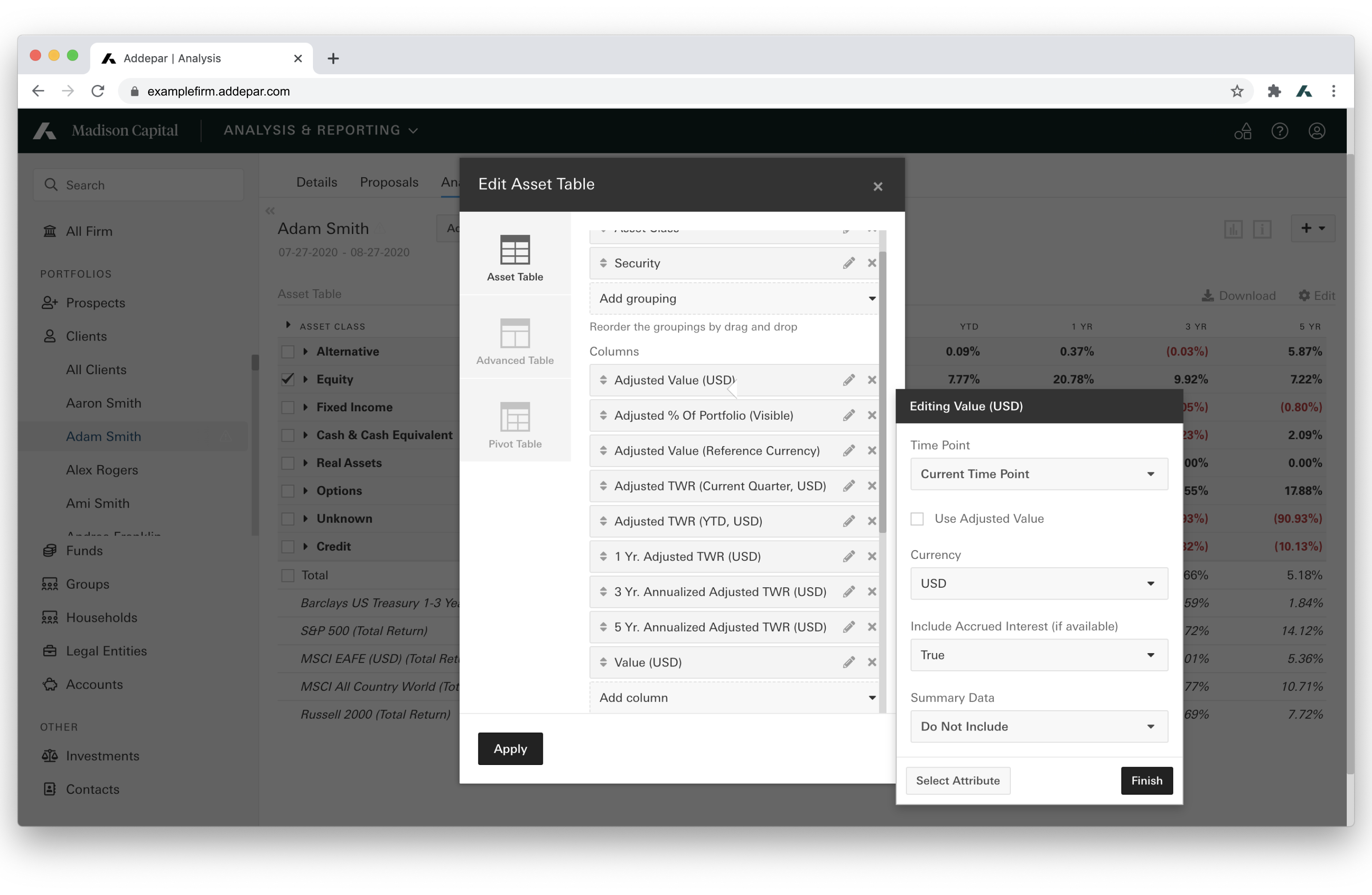
Time-Point Arguments (In-App)
| Parameter | Description | Example |
|---|---|---|
| current (default) | Current Time Point. | "time_point": "current" |
| P<quantity><interval> later (<rounding_type>) | Future Time Point. | "time_point": "P2M later (exact)" |
| inception | Inception Time Point. | "time_point": "inception" |
| Not supported | Performance Time Point. | N/A |
| P<quantity><interval> ago (<rounding_type>) | Relative Time Point. | "time_point": "P1Q ago (ceiling)" |
| starting | Starting Time Point. | "time_point": "starting" |
| <date:YYYY-MM-DD> | Static Time Point. | "time_point": "2019-12-31" |
| P<quantity><interval> inception (<rounding_type>) | Time Point From Inception. | "time_point": "P3Y inception (floor)" |
Interval & Rounding Legend:
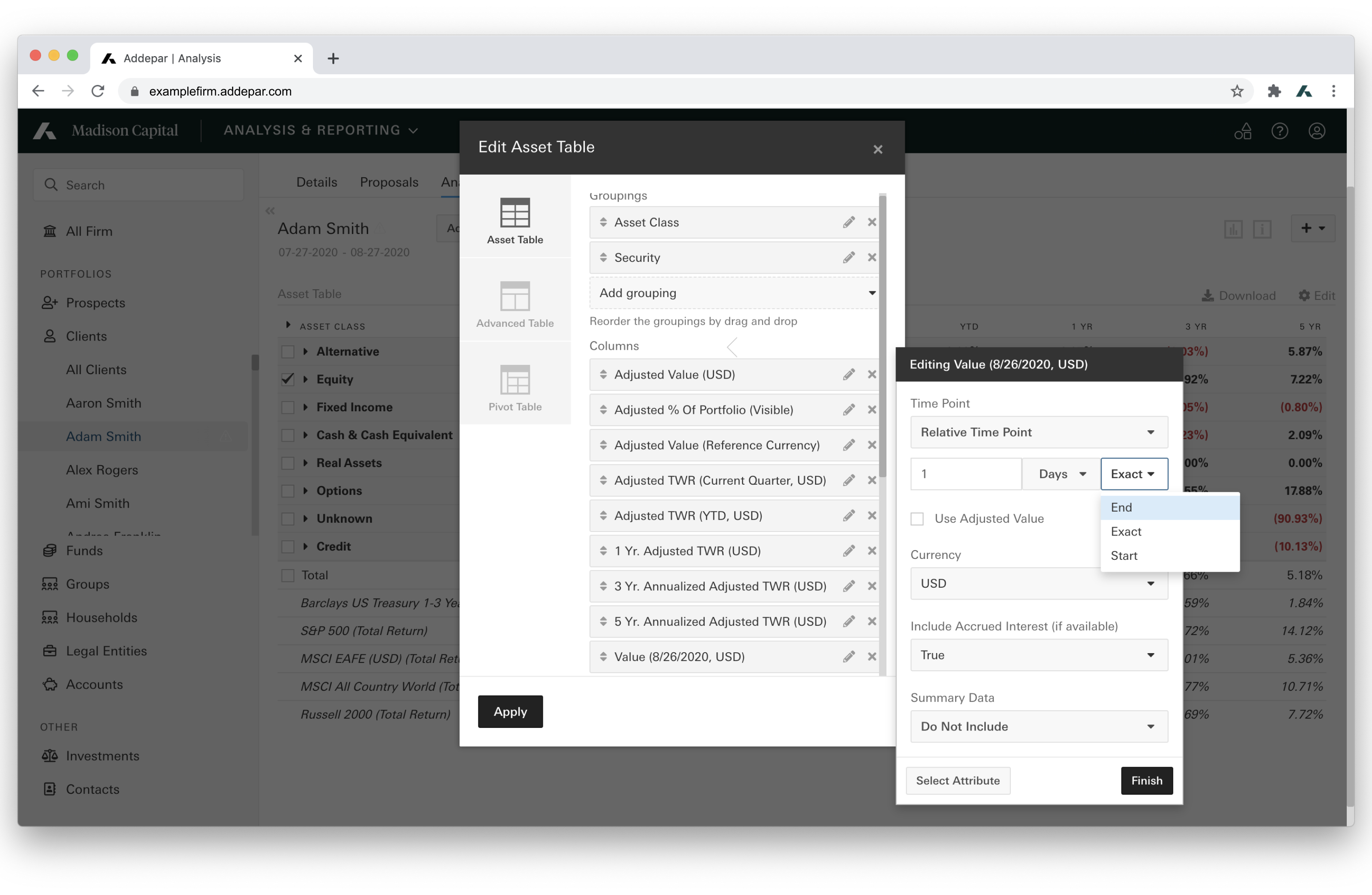
Rounding Values (In-App)
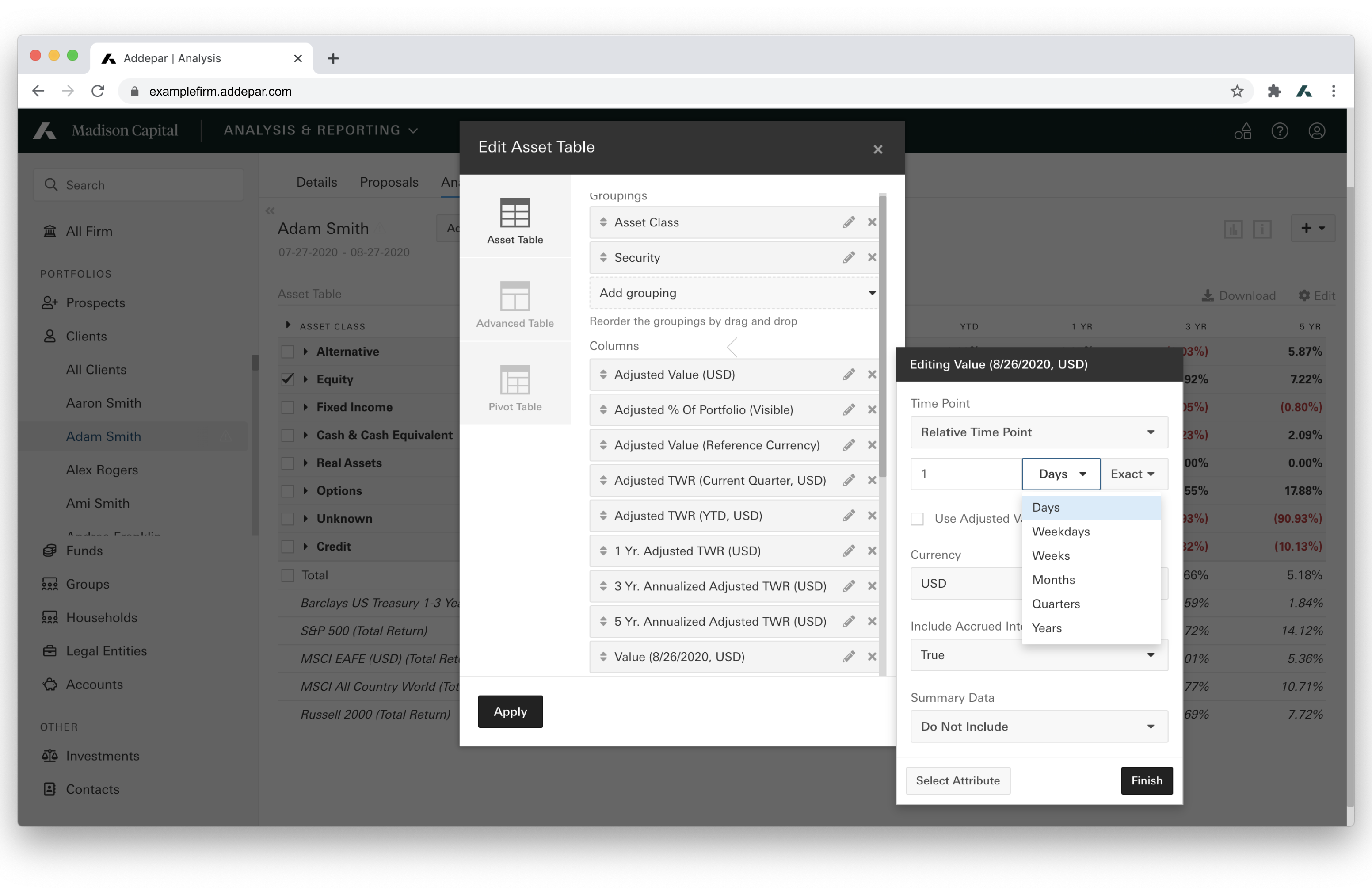
Intervals (In-App)
interval values
- D (Days)
- K (Weekdays)
- W (Weeks)
- M (Months)
- Q (Quarters)
- Y (Years)
If omitted, uses defaults.
rounding_types values
- floor (Start)
- exact (Exact)
- ceiling (End)
Example:
POST https://examplefirm.addepar.com/api/v1/portfolio/query

{
  "data":{
    "type":"portfolio_query",
    "attributes":{
      "columns":[
        {
          "key":"value",
          "arguments":{
            "adjusted":true,
            "time_point":"2019-12-31"
          }
        }
      ],
      "groupings":[
        {
          "key":"asset_class"
        }
      ],
      "portfolio_type":"firm",
      "portfolio_id":1,
      "start_date":"2018-06-30",
      "end_date":"2020-07-01"
    }
  }
}
HTTP/1.1 200
{
"meta":{
"columns":[
{
"key":"value",
"display_name":"Adjusted Value (12/31/2019, USD)",
"output_type":"Number",
"currency":"USD"
}
],
"groupings":[
{
"key":"asset_class",
"display_name":"Asset Class"
}
]
},
"data":{
"type":"portfolio_views",
"attributes":{
"total":{
"name":"Total",
"columns":{
"value":4.519257871178911E8
},
"children":[
{
"name":"Cash & Cash Equivalent",
"grouping":"asset_class",
"columns":{
"value":1.212095901E7
},
"children":[
]
},
{
"name":"Equity",
"grouping":"asset_class",
"columns":{
"value":2.6726534756527504E8
},
"children":[
]
},
{
"name":"U.S. Equity",
"grouping":"asset_class",
"columns":{
"value":0.0
},
"children":[
]
},
{
"name":"Fixed Income",
"grouping":"asset_class",
"columns":{
"value":4.367422731923816E7
},
"children":[
]
},
{
"name":"Derivative",
"grouping":"asset_class",
"columns":{
"value":8647625.0
},
"children":[
]
},
{
"name":"Hedge Fund",
"grouping":"asset_class",
"columns":{
"value":4.114859252892848E7
},
"children":[
]
},
{
"name":"Private Equity",
"grouping":"asset_class",
"columns":{
"value":5857038.349449425
},
"children":[
]
},
{
"name":"Alternative",
"grouping":"asset_class",
"columns":{
"value":2.189076738E7
},
"children":[
]
},
{
"name":"Real Assets",
"grouping":"asset_class",
"columns":{
"value":210135.405
},
"children":[
]
},
{
"name":"Unknown",
"grouping":"asset_class",
"columns":{
"value":5.111109456E7
},
"children":[
]
}
]
}
}
},
"included":[
]
}Time Period Argument Parameters:
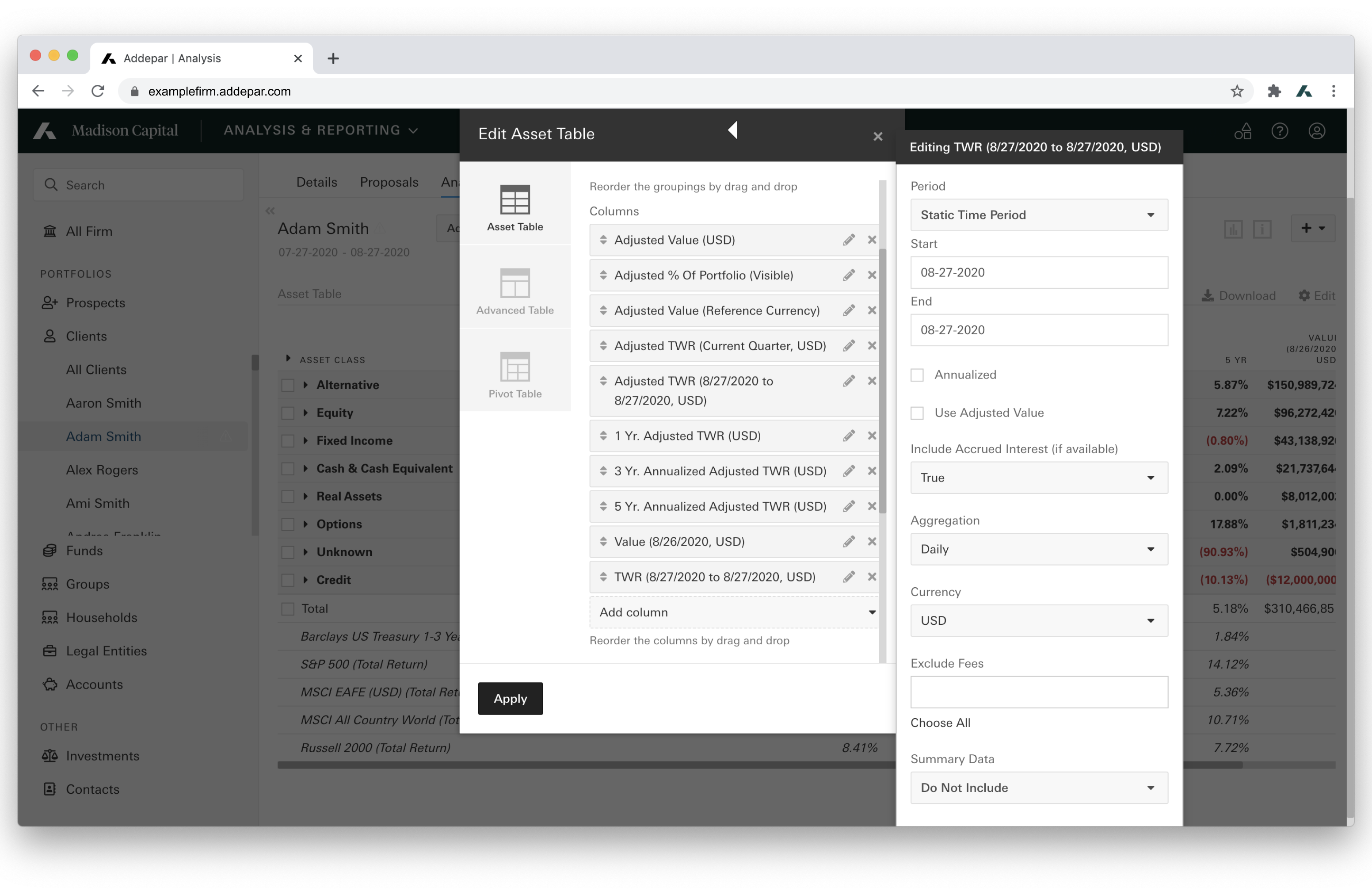
Time Period (In-App)
| Parameter | Description | Example |
|---|---|---|
| current (default) | Current Time Period. | "period": "current" |
| <time_point> to <time_point> | Custom Time Period. | "period": "P2M ago (exact) to 2020-06-30" |
| inception to start | Inception to Current Start Date. | "period": "inception to start" |
| relative P<quantity><interval> | Relative Time Period. | "period": "relative P5Y" |
| since inception | Since Inception Time Period. | "period": "since inception" |
| <date:YYYY-MM-DD> to <date:YYYY-MM-DD> | Static Time Period. | "period": "2019-12-31 to 2020-03-31" |
| trailing P<quantity><interval> | Trailing Time Period. | "period": "trailing P5Y" |
Interval & Rounding Legend:
interval values
- D (Days)
- K (Weekdays)
- W (Weeks)
- M (Months)
- Q (Quarters)
- Y (Years)
If omitted, uses defaults.
rounding_types values
- floor (Start)
- exact (Exact)
- ceiling (End)
time_point values
- Any formulation of time point arguments above.
Example:
POST https://examplefirm.addepar.com/api/v1/portfolio/query

{
  "data":{
    "type":"portfolio_query",
    "attributes":{
      "columns":[
        {
          "key":"time_weighted_return",
          "arguments":{
            "period":"trailing P5Y"
          }
        }
      ],
      "groupings":[
        {
          "key":"asset_class"
        }
      ],
      "portfolio_type":"FIRM",
      "portfolio_id":1,
      "start_date":"2018-06-30",
      "end_date":"2018-09-30"
    }
  }
}
HTTP/1.1 200
{
"meta":{
"columns":[
{
"key":"time_weighted_return",
"display_name":"5 Yr. TWR (USD)",
"output_type":"Percent",
"currency":"USD"
}
],
"groupings":[
{
"key":"asset_class",
"display_name":"Asset Class"
}
]
},
"data":{
"type":"portfolio_views",
"attributes":{
"total":{
"name":"Total",
"columns":{
"time_weighted_return":0.6001516639410265
},
"children":[
{
"name":"Cash & Cash Equivalent",
"grouping":"asset_class",
"columns":{
"time_weighted_return":-0.09253003508289892
},
"children":[
]
},
{
"name":"Equity",
"grouping":"asset_class",
"columns":{
"time_weighted_return":0.09482032818914576
},
"children":[
]
},
{
"name":"U.S. Equity",
"grouping":"asset_class",
"columns":{
"time_weighted_return":0.010000000000000009
},
"children":[
]
},
{
"name":"Fixed Income",
"grouping":"asset_class",
"columns":{
"time_weighted_return":-0.035795553494806676
},
"children":[
]
},
{
"name":"Derivative",
"grouping":"asset_class",
"columns":{
"time_weighted_return":2.325451087920276
},
"children":[
]
},
{
"name":"Hedge Fund",
"grouping":"asset_class",
"columns":{
"time_weighted_return":-0.16028249805399108
},
"children":[
]
},
{
"name":"Private Equity",
"grouping":"asset_class",
"columns":{
"time_weighted_return":0.1584577889571086
},
"children":[
]
},
{
"name":"Alternative",
"grouping":"asset_class",
"columns":{
"time_weighted_return":1.8333800108804938
},
"children":[
]
},
{
"name":"Real Assets",
"grouping":"asset_class",
"columns":{
"time_weighted_return":-0.23312214337687043
},
"children":[
]
},
{
"name":"Unknown",
"grouping":"asset_class",
"columns":{
"time_weighted_return":745.1347086793872
},
"children":[
]
}
]
}
}
},
"included":[
]
}Updated about 1 month ago